Subscribe to our social channels to get the latest news about Hungary!


Sponsored content
Invitations set the mood for any event. Whether it’s a wedding, birthday party, baby shower, or business event, a well-crafted invitation helps guests feel excited before they even arrive. Traditionally, designing invitations required graphic design tools or hiring a professional. But now, with CapCut Desktop Video Editing Software, anyone can create visually stunning video invitations that look polished and modern—without needing advanced design skills. CapCut isn’t just for editing videos; it’s also a powerful creative tool that can turn a simple idea into a professional-looking invitation. From adding text and stickers to enhancing with music and effects, CapCut makes the process quick, fun, and beginner-friendly.
Before we jump into the guide, let’s talk about why CapCut is ideal for invitation design:
CapCut Desktop isn’t limited to just one style. Depending on the vibe of your event, you can create:
The flexibility of CapCut allows you to design something that truly matches your event’s personality.
CapCut offers a range of amazing tools, including Voice Changer, AI Video Generator, and Text to Speech, among others. These tools help you create amazing invitation videos. Now let’s break it down into a simple process. Even if you’re a beginner, you can follow these steps to create your own stylish invitations.
Open CapCut Desktop and start a new project. Choose the canvas size that works best for your invitation. For digital invites, a 9:16 (vertical) format works well for phones, while 16:9 (horizontal) is ideal for wider displays. Import any photos, logos, or background images you’d like to use. For example, a wedding photo, a themed background, or a company logo. If you don’t have your own images, CapCut offers free background options and stock elements to help you get started.

This is where the creativity comes in. Use the Text tool to type the important details: event name, date, time, venue, and RSVP info. Play around with fonts until you find one that matches your theme. Add stickers and animations to enhance the design. Balloons, confetti, flowers, or sparkles can make the invitation feel more dynamic. Experiment with filters and effects. A soft glow for weddings, a bold neon effect for parties, or clean transitions for business events can elevate the design. Keep your design balanced—too many effects can overwhelm the viewer. Focus on clarity and style.
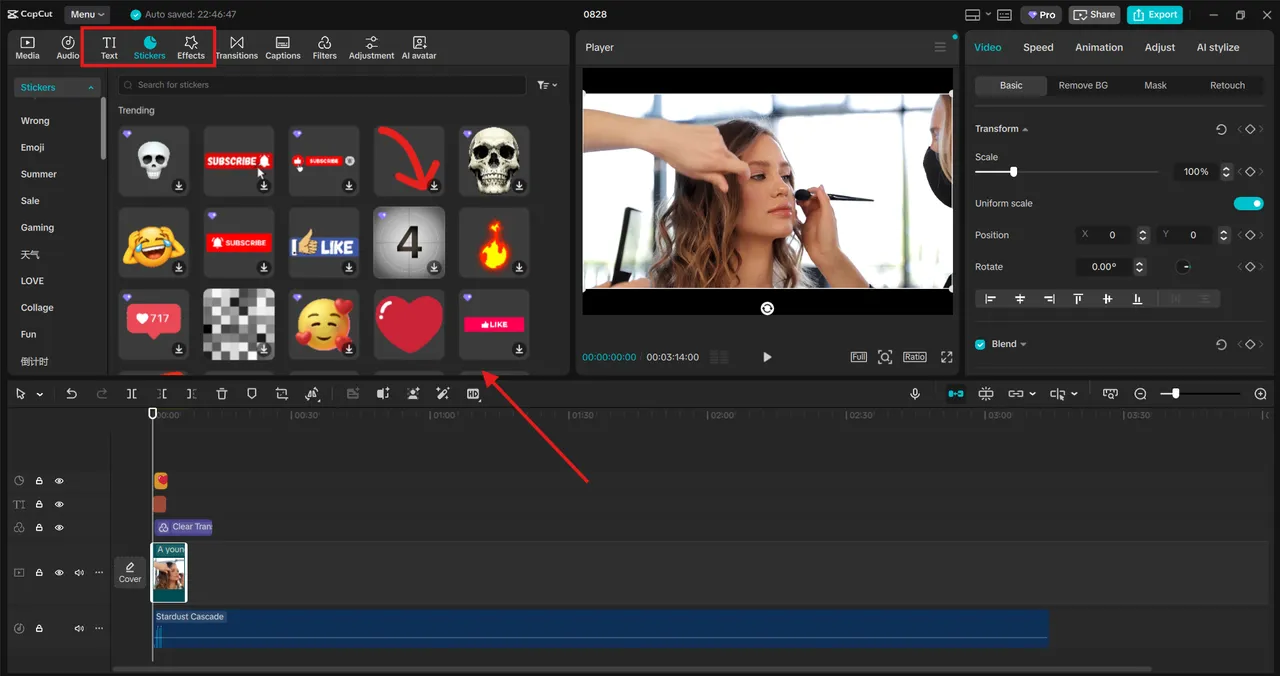
Now it’s time to make your invitation feel alive. Go to the Music library in CapCut and choose background audio that fits your event. A soft piano track for weddings, upbeat pop for birthdays, or professional tones for corporate events. Adjust the volume so the music complements the text without overpowering it. Once satisfied, click Export, choose your preferred format (MP4 is great for sharing), and save your invitation. Test your video invitation on your phone or computer before sending it out, to make sure everything looks and sounds perfect.
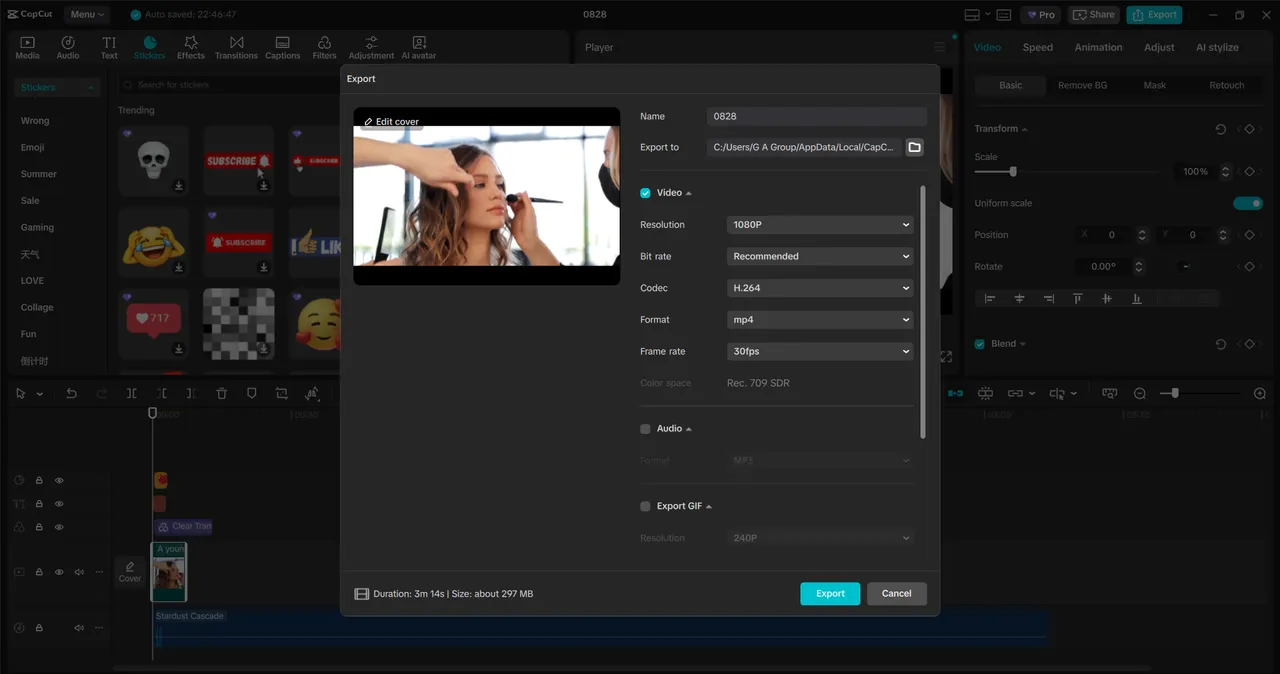
Designing invitations doesn’t have to be complicated. With CapCut Desktop Video Editing Software, you can create professional-quality video invitations that surprise and delight your guests. Its user-friendly interface, creative tools, and music integration make it the perfect choice for anyone looking to design something unique without the stress of learning complicated design programs. Whether you’re planning a cozy birthday celebration, a glamorous wedding, or a formal business event, CapCut allows you to design invitations that leave a lasting impression. CapCut also has an online photo editor, which you can try for free! So, instead of sending plain text or static cards, why not wow your guests with an engaging video invitation?
Disclaimer: the author(s) of the sponsored article(s) are solely responsible for any opinions expressed or offers made. These opinions do not necessarily reflect the official position of Daily News Hungary, and the editorial staff cannot be held responsible for their veracity.


