Subscribe to our social channels to get the latest news about Hungary!


Sponsored content
In this article, you will review the features, pros, cons, compatibility, and price of the five best photo recovery software tools to choose the right utility.
Most of our personal or professional data is stored in photos, which we frequently use to capture the beautiful moments of our lives. Unfortunately, photos are prone to corruption, formatting, and deletion, and no one wants to ever experience losing important photos.
Interestingly, photo loss is no longer a big issue, as today’s market offers several data recovery tools. These utilities help you restore your lost photos, videos, documents, emails, and other types of data. However, choosing a reliable tool often becomes tricky. This guide presents the 5 best highly reliable photo recovery software tools that protect your data.
Part 1. What to Consider While Choosing Good Photo Recovery Software?
Before getting into the specifics of various photo recovery tools, let’s first look at what you should keep in mind while selecting a dependable recovery utility.
Part 2. Top 5 Image Recovery Software for Windows & Mac
Are your photos lost for the very first time in your life? Want to get them back as soon as possible? Don’t panic. The tools below are considered among the best picture recovery software. Let’s look at what actually makes them stand out in today’s market.
1. Wondershare Recoverit
As the name suggests, this tool is purely designed for data recovery. It has all modern features to ensure quick, effective, and safe data recovery. Whether you want to recover photos, videos, audio files, documents, or anything else, Recoverit – Photo Recovery should be your number one choice.
Wondershare Recoverit is a leading consideration for millions of people around the world because of its superb recovery features, reliable recovery, and amazing customer support. Regardless of how you lost your pictures, this tool will help you restore them within minutes. However, the total recovery time depends on how much data you want to retrieve from the selected drive.
Features
Steps to Recover Photos with Recoverit
It is a simple, 3-step process.
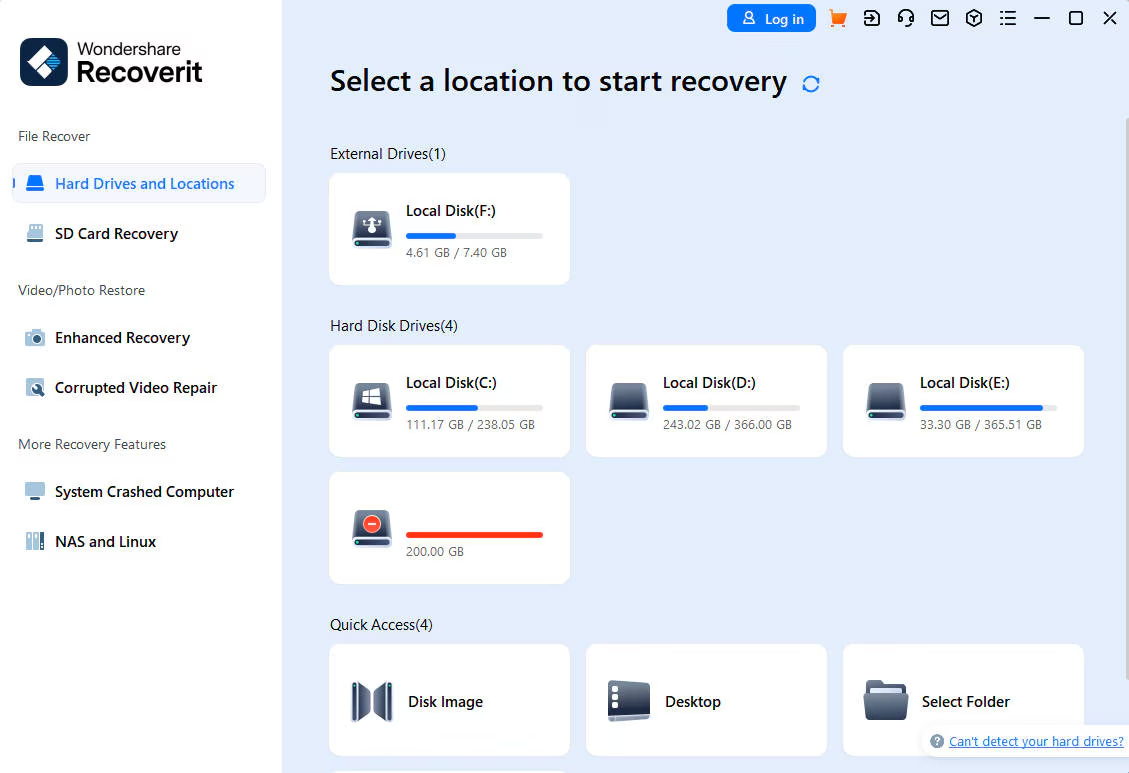
Step 1: Install Recoverit, launch it, and select the drive where you lost the photo files. Then, click Scan.
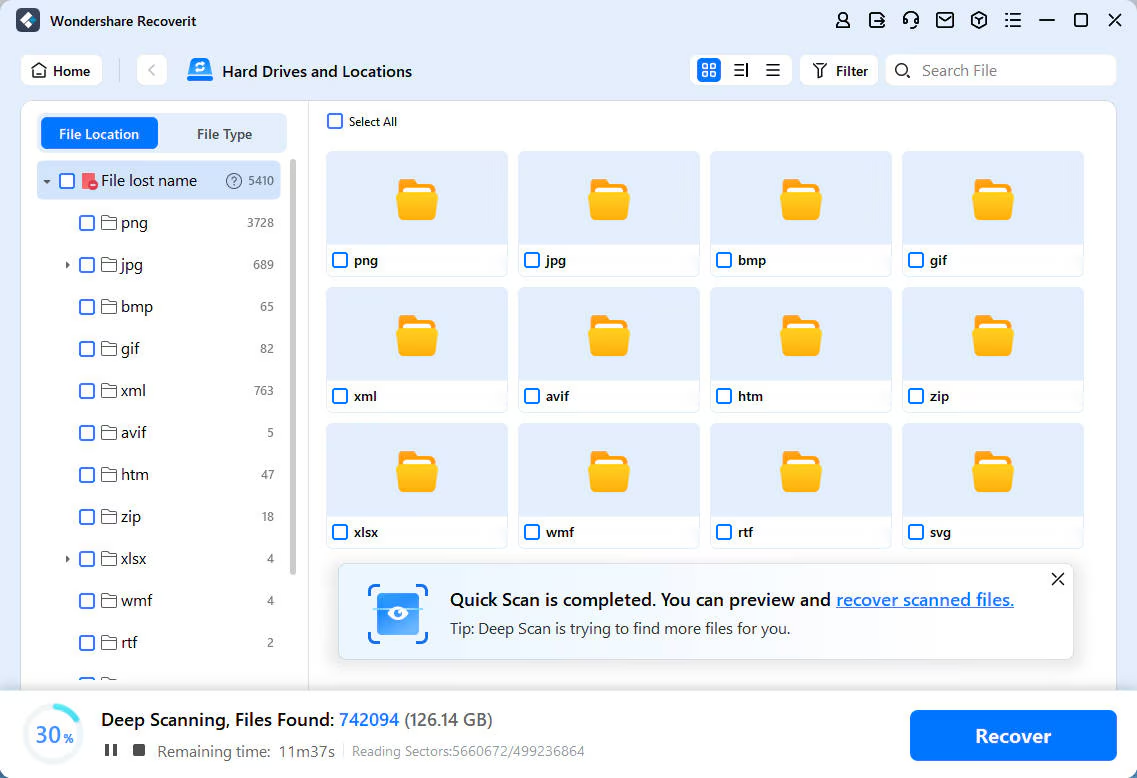
Step 2: Let the tool complete the scan. To quickly find lost pictures, filter files by selecting picture formats (e.g., PNG, JPG) from the left pane.
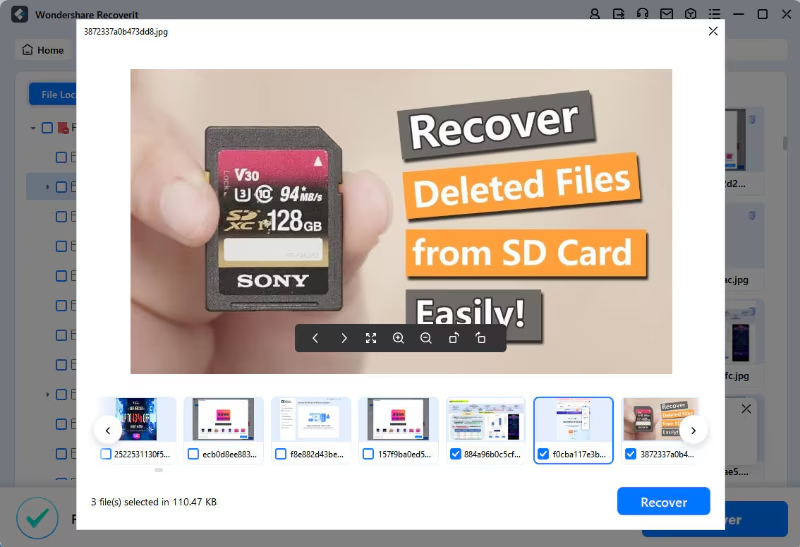
Step 3: Once you find the files you need, double-click the file will enable you to preview the result. If you have no problem with it, click Recover to download and save the files locally.
Pros
Cons
Compatibility: Windows, Mac, NAS, and Linux
2. R-Studio
Since it is a professional-grade photo recovery tool, IT professionals and tech users commonly use it. Whether your photos are formatted, accidentally deleted, or lost due to any other reason, R-Studio can help you restore them from various storage devices.
Features
People Like It For
People Dislike It For
Compatibility: Linux, Mac, and Windows
Price: Starting from $79.99
3. Recuva
This freemium tool is also listed among the best picture recovery software. Piriform specifically developed this utility to assist users in restoring deleted or lost data, including images, from different storage devices. It is more popular among Windows users.
Features
People Like It For
People Dislike It For
Compatibility: Windows
Price: $29.95 for up to 3 computers
4. DataRescue
With this data recovery software, you can easily recover formatted, deleted, or lost photos from SD cards, SSDs, hard drives, USB drives, and other storage devices. Though it is compatible across devices, Mac users frequently use it for image recovery.
Features
People Like It For
People Dislike It For
Compatibility: Windows and Mac
Price: $0 (free trial), $79 (standard), and $399 (professional).
5. Puran File Recovery
This utility is designed to perform a free photo recovery on Windows OS. You can restore lost pictures from a variety of devices. It is best known for its practical and lightweight photo recovery.
Features
People Like It For
People Dislike It For
Compatibility: Windows
Price: Free to use.
Part 3. Actionable Tips to Maximize Your Photo Recovery Success
The following tips may help increase the chances of recovering photos.
Final Words
Deleting or misplacing your photos can be frustrating. Thanks to modern photo recovery tools, it is no longer a challenge. Whether you’re a Mac or PC user, you can recover lost or deleted photos with various tools, such as Puran File Recovery, Recuva, R-Studio, and DataRescue. If you are more concerned about your data privacy, try Recoverit.
FAQs
Can I recover photos after emptying the Trash or Recycle Bin?
Yes, you can recover your lost pictures, even if your Recycle Bin or Trash is empty. As long as the data is not overwritten, you can recover photos anytime.
Do recovered photos lose their original quality?
No, recovered pictures don’t lose their original quality and resolution. However, it can only happen if the data is not overwritten.
How long does photo recovery take?
The recovery time largely depends on how many photos you want to restore. It also depends on whether you perform a quick or deep scan. Generally, the photo recovery can take between a few minutes and several hours.
Disclaimer: the author(s) of the sponsored article(s) are solely responsible for any opinions expressed or offers made. These opinions do not necessarily reflect the official position of Daily News Hungary, and the editorial staff cannot be held responsible for their veracity.


